
Clean Like
KAJO TECHTools
3.94.00 Reviews
- Version
- 3.0.0
- Installs
- 50.00K
- Age Rating
- Everyone
Screenshots
Our Review of Clean Like
 Analysis by Appyee
I tried Clean Like as a practical tools app rather than treating it as a one-tap miracle. Its promise is easy to understand: help tidy unwanted files, keep an eye on battery behavior, check connection speed, and refresh a phone’s speakers. That combination makes sense for people who want a small maintenance kit instead of several separate utilities. My first impression was that it is aimed at quick, occasional actions, not at users who want deep control over every part of Android.
The app comes from KAJO TECH and is free to use. It is listed for Everyone, works from Android 9 onward, and the current release is version 3.0.0. Its average rating is 3.9 from roughly seventy ratings, with a smaller number of written reviews, and it has passed fifty thousand installs. Those figures suggest a modest but real user base rather than a heavily established household name. I would approach it as a lightweight helper worth testing, while keeping expectations realistic about how much it can improve a phone that is already well maintained.
What Clean Like feels like during the first week
During the first week, the appeal comes from having several familiar maintenance tasks gathered in one place. Instead of opening storage settings, searching for a battery screen, visiting a speed-test service, and looking for a speaker-cleaning tool separately, I can use one app as a starting point. That convenience is the strongest reason to install it. The individual jobs are not unusual, but the compact combination is useful when I want a quick check without building my own toolkit.
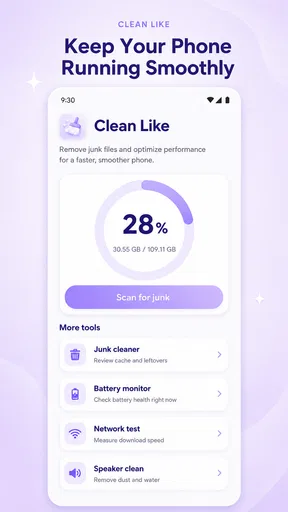
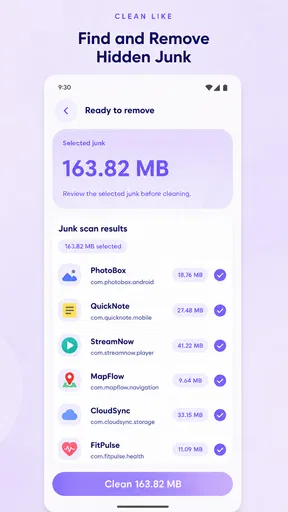
The junk-cleaning area is likely to attract the most attention because storage warnings are easy to understand. I would use it before a trip, before recording a long video, or when an older phone begins complaining about space. The important habit is to inspect what the app identifies before approving a cleanup. A file that looks unnecessary in a broad category may still be useful, especially when downloads, saved media, or application leftovers are mixed together. Convenience should not replace a quick review of what is about to be removed.
That small pause matters more than the speed of the scan. A cleaning tool is helpful when it makes clutter visible, but it becomes frustrating if the user feels pushed toward deleting everything immediately. My preferred workflow is to scan, sort mentally by importance, remove only clearly disposable material, and then check the result in the phone’s own storage settings. That second look keeps the app in a supporting role and reduces the chance of treating cleanup as a routine button press.
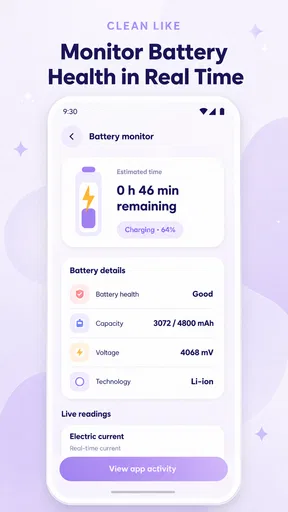
The battery section is more useful as a monitoring aid than as a repair system. I would open it when the phone suddenly seems to lose charge faster than usual, after installing a demanding app, or when I want to understand whether a busy day is normal for my usage. A battery monitor can point me toward a pattern, but it cannot turn an aging battery into a new one. If the real problem is a damaged battery, poor reception, high screen brightness, or an app running constantly, the phone’s system settings may provide the more decisive answer.
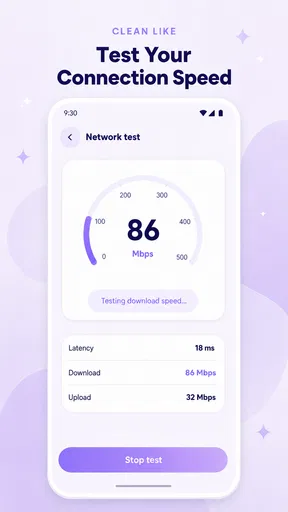
The speed-check function has a similarly practical role. I would use it to compare a home connection with mobile data, investigate whether a video call problem is local to my phone, or check whether a router restart made a difference. One result is not a diagnosis, though. Network tests change with distance from the router, congestion, server selection, and the time of day. The best use is to repeat the check from the same place and under similar conditions rather than treating one reading as a final judgment on an internet provider.
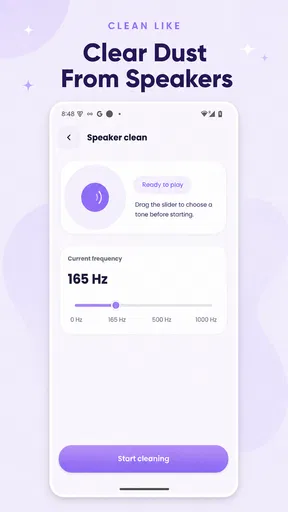
The speaker-refreshing feature is the most distinctive part of the package. It is the kind of tool I would reach for after using a phone outdoors, near dust, or around light splashes, when the speaker sounds muffled but there is no obvious hardware failure. I would keep the volume at a sensible level and stop if the sound becomes unpleasant. A tone-based refresh can be a reasonable first attempt at clearing minor obstruction, but it is not a substitute for careful physical cleaning or professional repair when the speaker has been damaged.
A realistic everyday routine
Imagine leaving for a weekend with a nearly full phone and unreliable hotel Wi-Fi. I could use Clean Like to review disposable storage, check the battery situation before relying on navigation, and run a connection test after joining the hotel network. If the phone’s speaker sounds dull after being carried in a dusty bag, I could try the refresh function before making a call. The value in that scenario is not any single tool; it is having a short sequence ready when several small problems appear together.
That workflow also shows the app’s limits. It does not remove the need for backups, sensible battery habits, or careful network troubleshooting. I would not use a cleaner as my backup strategy, and I would not delete personal files simply because they appear in a cleanup result. Likewise, a speed result cannot explain every streaming problem, and a speaker refresh cannot correct a cracked speaker grille. Clean Like is most convincing when used as a first response, not as the final authority.
Whether it earns a place after the novelty fades
The first-week question is easy: does the app gather useful actions in a convenient way? The harder question is whether I would still open it month after month. For me, that depends on how often the phone develops a real maintenance need. Storage cleanup is usually occasional, battery checks become valuable during troubleshooting, speed tests are situational, and speaker refreshes are even less frequent. That means the app’s recurring value comes from being available when something feels wrong, not from demanding daily attention.
I would not build a ritual around scanning junk every morning. Repeated cleaning can become counterproductive if it encourages deleting caches or temporary material without understanding how Android and individual apps manage storage. A better routine is event-based: use the cleaner when storage is genuinely tight, after a period of heavy downloads, or before a journey when free space matters. This makes the app less intrusive and gives each scan a clear purpose.
Battery monitoring can support a monthly check, especially for someone who notices a change in endurance. I would compare the result with actual behavior: screen time, signal strength, navigation, gaming, and background activity. If the monitor suggests a problem but everyday use feels normal, I would not keep chasing small variations. If the phone consistently drops charge unusually fast, I would move to Android’s built-in battery tools and consider whether the hardware itself is aging.
Speed testing has value when it answers a specific question. For example, I might run it before and after moving a router, then repeat it in the same room. I would avoid using the app as a competitive scoreboard or assuming that the fastest reading represents the connection all day. The test is most useful when paired with a decision, such as choosing between Wi-Fi and mobile data for a call, reporting a persistent service issue, or identifying a weak spot at home.
The speaker tool is naturally occasional. Its long-term value is that I do not need to search for a separate utility when the speaker suddenly sounds muted. Still, I would not run it as preventive maintenance without a reason. Unnecessary repetition adds noise to the routine and may make the feature feel like a gimmick rather than a useful remedy. The best recurring habit is simply remembering it exists when the symptom appears.
How it compares with the usual alternatives
Android’s built-in storage and battery screens are usually the better choice for detailed, system-level information. They are already integrated into the phone, so they generally provide context that a general-purpose utility may not match. Files by Google or a manufacturer’s file manager can also be preferable when I want precise control over documents, large videos, duplicate material, and downloads. Clean Like wins on having several maintenance categories together, but it does not automatically make those dedicated tools unnecessary.
For internet checks, a dedicated speed-test service usually offers a more focused experience and may be preferable when I need repeatable testing or more network detail. For speaker problems, a specialized audio tool or careful physical inspection may be more suitable if the issue persists. The advantage here is breadth: one free app can cover several small jobs. The trade-off is depth. Users who want advanced diagnostics, extensive filtering, or detailed history may quickly outgrow it.
This distinction is important for deciding who should keep it installed. I think it suits people who prefer a simple toolbox, users helping a family member maintain an older Android phone, and anyone who wants a quick first step before opening more technical settings. It is less suitable for power users who already have a carefully chosen file manager, network tester, battery monitor, and audio utility. In that case, the extra app may create overlap rather than reducing clutter.
The maintenance burden and the small points of friction
A maintenance app can create its own maintenance burden. I would watch for repeated prompts, unnecessary notifications, or pressure to scan when nothing needs attention. Even when an app is free, my time and attention are costs. If Clean Like stays quiet until I need it, that supports its long-term case. If it constantly reminds me to optimize a phone that is working normally, the novelty will wear off quickly.
I would also be careful with broad cleanup recommendations. The safest workflow is to treat every proposed deletion as a decision, not an instruction. Personal photos, offline maps, downloaded documents, and media saved for travel should be checked manually. A clean storage screen is not worth losing something important. This is one area where the phone’s built-in file tools may be slower but clearer, especially for anyone unfamiliar with Android storage categories.
Battery information can also cause unnecessary worry. A single bad day may come from weak signal, high brightness, navigation, camera use, or a software update rather than a failing battery. I would look for repeated patterns across normal days before changing settings or uninstalling apps. Clean Like can help me notice a concern, but good judgment still has to separate a temporary spike from a genuine problem.
The speaker refresher deserves the same caution. I would never interpret a temporary improvement as proof that the hardware is healthy, and I would not use it to avoid checking for moisture or visible damage. If sound remains distorted, quiet, or crackly after a sensible attempt, a repair shop or manufacturer support is the more appropriate next step. A general tools app should not be treated as a diagnostic certificate.
Another source of friction is the possibility of switching between this app and Android’s own controls. That is not necessarily a flaw, but it affects expectations. Clean Like can make the first step easier; it cannot guarantee that every follow-up action happens inside the same interface. I would install it for convenience, not because I expect it to replace the operating system’s settings or specialist utilities.
Who will benefit, and who should skip it
I would recommend trying it if your phone regularly fills with temporary clutter, you occasionally need a quick connection check, or you like having a single place for small maintenance tasks. It is especially approachable for someone who does not want to learn several technical apps. The Everyone content rating and free price also make it easy to consider for a shared household device, although I would still explain the cleanup step before another person uses it.
I would skip it if your main need is secure file management, detailed battery health analysis, professional network troubleshooting, or a reliable fix for physical speaker damage. In those situations, built-in Android settings, a dedicated file manager, a specialized network tool, or hands-on repair is likely to be better. I would also avoid installing it solely because a phone feels slow; storage, background apps, heat, signal, and hardware age all require different solutions.
For someone with very limited free space, I would first remove large personal files and review downloads manually. A cleaner can help identify candidates, but no utility should be trusted blindly with irreplaceable material. For someone worried about battery life, I would begin by checking usage patterns and screen settings. For someone with weak internet, I would run several tests in consistent conditions. In each case, Clean Like is useful when it supports a clear process rather than replacing one.
My long-term verdict
After the initial appeal, I see Clean Like as a situational toolbox rather than an app that deserves constant attention. Its strongest idea is practical bundling: storage cleanup, battery observation, connection testing, and speaker refreshing address different minor problems without requiring several downloads. The free model makes experimentation straightforward, and the Android compatibility beginning with version 9 keeps it relevant to a broad range of phones.
Its lasting value depends on restraint. I would keep it installed if I used the storage scan before trips, checked battery behavior when endurance changed, tested networks during real connection problems, and remembered the speaker tool for occasional muffling. I would remove it if it became a source of repeated alerts, duplicated tools I already trusted, or careless cleanup habits. The app earns its place through occasional usefulness, not through constant optimization theater.
My recommendation is therefore measured but positive. Clean Like is worth trying for Android users who want a free, approachable maintenance companion and understand that its tools are starting points. It is not the best choice for deep diagnostics or users who already prefer dedicated utilities. If you use it selectively, review cleanup suggestions, repeat tests when results matter, and treat speaker refreshing as a limited first aid step, it can remain handy after the first week instead of becoming another forgotten installation.
Verdict
Strengths of Clean Like
- Simple interface makes cleaning tasks easy to understand.
- Helps organize household chores into manageable routines.
- Useful reminders can support more consistent cleaning habits.
- Suitable for users who prefer a focused, no-frills cleaning tool.
- Can make recurring chores easier to track over time.
Limitations of Clean Like
- May feel too basic for users wanting detailed home management tools.
- Reminder options may not offer enough customization for everyone.
- Requires regular updates to reflect changes in your cleaning routine.
- Some features may depend on device permissions or notification access.
- Not ideal for users seeking shared household task management.
Similar Picks in This Category
View All
Google LLC4.0

Gboard - the Google Keyboard
Google LLC4.5

Google Play services
Google LLC4.3

Google Play Store
Google LLC4.9

Files by Google
Google LLC4.5

SHAREit: Transfer, Share Files
Smart Media4U Technology Pte.Ltd.4.3
Frequently Asked Questions
What is Clean Like and what does it do?
Clean Like is designed to help users organize and clean up content associated with their social media activity, such as liked posts, saved items, or other account interactions, depending on the platform and version available. Its main purpose is to reduce clutter and make account management more convenient. Before downloading, review the current app description carefully because supported services and available cleaning tools may change over time.
Is Clean Like safe to use with my social media account?
Safety depends largely on how Clean Like connects to the service you use. You should only sign in through an official, secure authorization page and avoid entering your password directly into an unfamiliar form. Check the developer’s identity, privacy policy, permissions, and recent user reviews before proceeding. It is also wise to enable two-factor authentication and revoke access later if you stop using the application.
Can Clean Like delete or remove likes and other activity automatically?
Clean Like may provide tools for removing or managing likes and similar activity, but the exact functions can depend on the connected platform, account limitations, and the app version installed. Some actions may require manual confirmation, while others could be processed in batches. Read every confirmation screen carefully before starting, because deleted activity may be difficult or impossible to restore afterward.
Is Clean Like free to download and use?
The application may be available as a free download, but certain features can be restricted behind in-app purchases, subscriptions, advertisements, or usage limits. Pricing and included tools may vary by operating system, country, and update. Before beginning a cleanup session, check the store listing for current subscription terms, renewal details, and cancellation instructions so you understand the potential cost.
What should I check before downloading Clean Like?
Before installing Clean Like, verify that your Android or iOS device meets the listed requirements and that the app is published by the legitimate developer. Look at the requested permissions, privacy disclosures, update history, ratings, and recent reviews. You should also back up important information and understand exactly what the app can change, since account-management tools may perform actions that cannot be undone.
